Slow down #
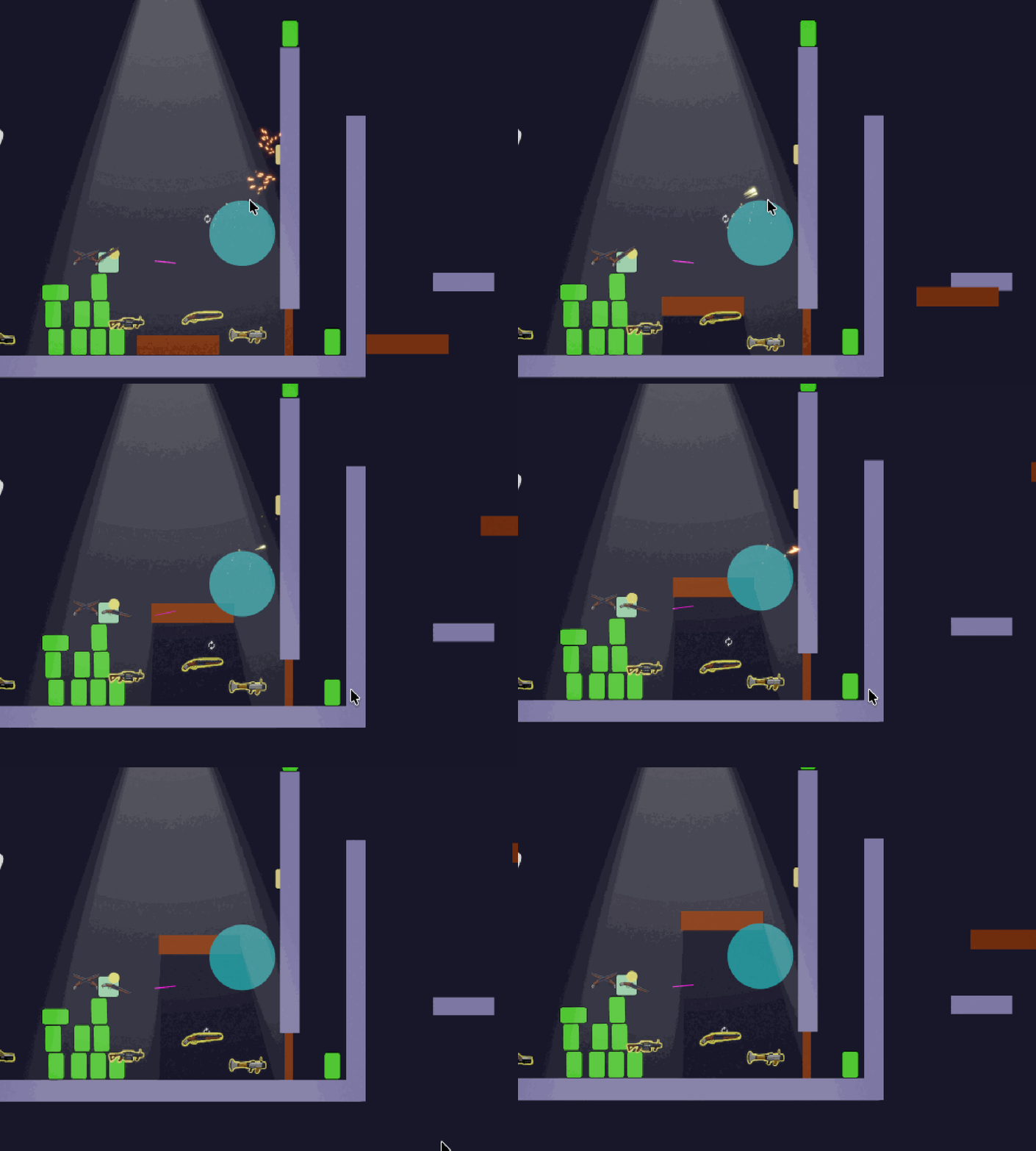
One of the very first features implemented for heist was what I call ‘Time Shifts’. These are bubbles (or any collider shape actually) that slows down objects that enter it. The concept is simple, and in practice implementation was also fairly straight forward (with some caveats). It mostly boils down to, if an item enters a time warp bubbles collision shape (OnTriggerEnter), we modify a value that it scale’s it’s deltaTime by and do some book keeping. When it exits (OnTriggerExit), we reset it back to normal. There are some edge cases that make it a little more complex than that, but it pretty much boils down to that.

A (Time)Shift in perspective #
Let’s start with the data/state that we need for TimeShift’s. This is applied to all entities that should be affected by the time warp feature.
component TimeShift
{
    Boolean ShouldIgnore;

    FP TimeScale;
    FP NextFrameTimeScale;

    FPVector2 VelocitySnapshot;
    FP GravityScaleSnapshot;
    FP AngularVelocitySnapshot;
}
Quick breakdown of it’s properties:
ShouldIgnore| Tells the system if this entity should be ignored. Useful for temporarily disabling the timescale effect.TimeScale| TimeScale value that is used to multiply by deltaTime. Typically between 0-1NextFrameTimeScale| Used to set the timeScale value for the next frame. Useful in situations when reverting the timescale back to ‘1’. This ensures that all systems in the current frame finish using the current ‘TimeScale’ before being reset next frame.VelocitySnapshot/GravityScaleSnapshot/AngularVelocitySnapshotAre specific to PhysicsBodies, and holds a snapshot of their respective values before entering a TimeShiftModifier entity
Next, lets take a look at the TimeShiftModfier component. These are the actual bubbles that slow down things that
enter it.
component TimeShiftModifier
{
    dictionary<entity_ref, FP> OriginalTimeScaleMap;
    list<MaskModifierPair> MaskModifierList;
}

struct MaskModifierPair
{
    LayerMask TargetMask;
    FP Modifier;
}OriginalTimeScaleMap| This holds the value of theentity_ref’s timeScale BEFORE entering the TimeScaleModfier. This allows us to reset that value when the entity exits the TimeScaleModifierMaskModifierList| This lets us assign different slowdown values on a per-layer basis. This is useful because, bullet projectiles & players move at very different speeds by default. If we just had 1 modifier speed, we would need to tune it to either be ideal for very fast objects, or more normal speed objects (like the player). As a designer, it’s nice be able to normalize the slow-down affect that gets applied to various objects!
“It’s really that easy?” #
For the actual logic, It’s pretty simple. If something enters the TimeShiftModifiers’ collider, add it to the
affected entities dictionary, and set it’s timeShift component’s timeShift value to the Modifier’s scale value. For
physics bodies, we need to do a little bit more work. We need to store a snapshot of their velocities, in order to
reset them every frame so that forces don’t apply to them.
In the TimeShiftSystem, we have:
// In OnTriggerEnter(...)

// Gets the modifier scale value from the 'MaskModifierList' | Could be really small for the projectile layer (0.001)
// or less extreme for players (0.1) for example
if (!timeShiftModifier->TryGetTimeShiftModifier(f, collider2D->Layer, out FP modifier))
    return;

// Add entity entry into map with original timeScale Value
var timeMap = f.ResolveDictionary(timeShiftModifier->OriginalTimeScaleMap);
timeMap[info.Other] = timeShift->TimeScale;

// Set timescale to new value
timeShift->SetTimeScale(modifier);

// Special handling for physics body entities
if (f.Unsafe.TryGetPointer<PhysicsBody2D>(info.Other, out var body))
{
    timeShift->VelocitySnapshot = body->Velocity;
    timeShift->AngularVelocitySnapshot = body->AngularVelocity;
    timeShift->GravityScaleSnapshot = body->GravityScale;
}
And when the object exits the TimeShift collision shape trigger, we reverse the effects and cleanup the entity from the map:
// In OnTriggerExit(...)

timeShift->NextFrameTimeScale = originalScale;
timeMap.Remove(info.Other);

// Reset back to the original velocities
if (f.Unsafe.TryGetPointer<PhysicsBody2D>(info.Other, out var body))
{
    body->Velocity = timeShift->VelocitySnapshot;
    body->AngularVelocity = timeShift->AngularVelocitySnapshot;
    body->GravityScale = timeShift->GravityScaleSnapshot;
}

Here, instead of setting the timeShift value back immediately, we set the NextFrameTimeScale variable instead.
This prevents fast moving objects like projectiles from speeding off without calculating their collision properly.
Projectiles queue their raycasts in the beginning of the frame and use the results/calculate their new position
later in the frame, after the time shift systems have run.
This is what it would look like if we didn’t use NextFrameTimeScale:
A body in motion #
We still need to properly handle those physics bodies though! We cant just scale their timestep down, since physics
generally operates on Fixed timesteps. Even if we could change the delta time that Quantum’s physics system uses,
this would prove disastrous, since that wouldn’t be deterministic. Instead, for physics bodies, we simply ‘freeze’
their velocities at the moment they enter the timeShiftModifiers. This is done by saving a snapshot of
velocity values, as seen above. Then applying those snapshot values every frame before the physics system runs. We do
this in another system called TimeScalePrePhysicsSystem. It’s logic looks like:
// In TimeScalePrePhysicsSystem | Looping through all TimeShiftModifier components

var timeShiftModifier = filter.TimeShiftModifier;

var shiftMap = f.ResolveDictionary(timeShiftModifier->OriginalTimeScaleMap);

// Map of captured entities inside the timeShiftModifier
foreach (var pair in shiftMap)
{
    var entity = pair.Key;

    // Cleanup entities that may have gotten removed while being affected by the timeShiftModifier
    if (!f.Exists(entity))
    {
        shiftMap.Remove(entity);
        continue;
    }

    // Early out if not a physics body
    if (!f.Unsafe.TryGetPointer<PhysicsBody2D>(entity, out var body))
        continue;

    // Early out if the timeshift component somehow got removed (unlikely scenerio)
    if (!f.Unsafe.TryGetPointer<TimeShift>(entity, out var timeShift))
        continue;

    // Apply timescale to snapshotted velocities every frame that the
    // physics body is under the timeShiftModifier's influcence
    body->GravityScale = FP._0; // Also disable gravity for the body
    body->Velocity = timeShift->VelocitySnapshot * timeShift->TimeScale;
    body->AngularVelocity = timeShift->AngularVelocitySnapshot * timeShift->TimeScale;
}
What’s the catch? #

It seems pretty simple, and it is…except for another edge case. If a projectile is moving REALLY fast, it can
penetrate quite far into a timeWarpModifier’s collider in 1 frame before OnTriggerEnter gets fired off. The result
is a bullet that only slows down half way (or more) already in the bubble. If it’s moving REALLY fast, it can blow
right past
the timeWarpModifier altogether.
That’s lame.
Case in Point:
For the fix, I addressed that inside the projectile system code directly. When a projectile does it’s raycast to figure out if it hit anything, I have it look for triggers/timeShiftModifier’s directly:
// Inside BulletProjectileSystem | Looping through all hits the bullet might have encountered this frame
if (hit.IsTrigger)
{
    if (!hasHitTimeShift && f.Unsafe.TryGetPointer<TimeShiftModifier>(hit.Entity, out var modifier))
    {
        var map = f.ResolveDictionary(modifier->OriginalTimeScaleMap);
        if (map.ContainsKey(bulletEntity))
            continue;

        nextPosition = hit.Point;
        hasHitTimeShift = true;
    }
    continue;
}
This sets the bullet to be just inside the timeShiftModifier’s collider, and will be picked up by next frame’s
OnTriggerEnter.
Conclusion #
That really is it! It is definitely a bummer that we had to have the timeShiftModifier’s logic spill into the bullet projectile system, but it would have been worse to have been dogmatic about maintaining ‘code cleanliness’ if it meant not fixing the actual issue. It’s important to remember, players DO NOT CARE how perfectly encapsulated your code is, but they will care if your game isn’t fun, or is a buggy mess. I still might poke around sometime to try to find a better solution, but that will have to wait until I’ve finished the game loop!
Thanks for reading!